Posts

Showing posts with the label Tips and Tricks

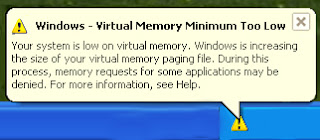
Warning: Windows Virtual Memory Minimum too low
Image
When there is less physical memory(Hardware Ram) than needed , then some virtual memory (virtual RAM) is created on the disk.When there is a limit set to the size of virtual memory usage and there is not enough of it present there is a warning that frequently comes “Virtual Memory too low”. Solution 1 : This problem occurs when physical RAM Plus Virtual RAM (usually created on hard disk) together are not sufficient to take care of the currently needed RAM size, or this error is arise. This usually happens when some fixed upper limit for Virtual Memory has been set. To solve this problem, you can either upgrade you physical RAM on your computer (recommended), or you can set the Virtual Memory to system managed size or you can do both. Setting Virtual Memory to system managed size means windows will set it to higher size whenever needed automatically for this. Right click on My computer –> go to properties> go to advanced tab, click on performance settings, now click on advanced, ...

How to Disable Adobe Reader Automatic Updates

Image
Like me, if you are also annoyed with Adobe reader Updates popping up and downloading the application Updates, You can disable it by follow the steps, Step # 1   Step # 2   Step # 3   Step # 4 In Final Step a window will Pop Simply Unchecked Automatic updates for adobe reader and uncheck application adobe reader 8. Note:Verified on adobe reader 8

How to convert Visio document to PDF

 Open Microsoft Visio  Open a Visio document (.VSO or .VSOx)  Select from main menu "File"->"Print"  Select Printer " Any Virtual PDF Printer (Like Primo Pdf).  Click "OK"  A dialog will pop up, assign the folder and file name of the PDF document to be generated  Congratulations! You have converted Microsoft Visio to PDF document now. NOTE: The above instructions also apply when you are to convert any Format to PDF Format.

What is the thumbs.db File? How to Delete it?

Image
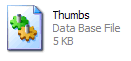
When You See a Folder In a   Thumbnail View Windows automatically created a Thumbs.db file in folders containing images. People often panic thinking its a virus file and scan drives. Well, nothing to worry about it’s just a cache of the thumbnail pictures in that folder. To stop creating the thumbs.db file automatically follow these steps: Open “My Computer” Goto Tools > Folder Options >  click the “View” tab. Place a check on the option ” Do not cache thumbnails” and press “Ok”. Next step is to search for all the thumbs.db file and delete them.  Now, Go to Start> Search > select Files and folder.  Enter “thumbs.db” in the search box  In “Look in” Drop down menu select” All Hard Drives and also see in hidden files” and press ” Search”.  A long list of thumbs.db files will appear, Select all and “delete”. It can be helpful if  you are having very low disk space and don’t use thumbnail views. Thats it! You have done.

Resolving an IP Conflict in Windows XP/7

Image
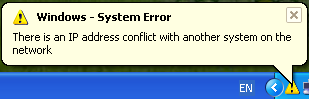
Windows 2000 / XP / Vista / 7: Log into the computer. Click the Start button then Control Panel. If you are running Windows XP, click Switch to Classic View if you are not already in the Classic View. Double click on Administrative Tools . Double click on Event Viewer .The Event Viewer should open. Click on the System icon in the left side pane.   Windows Vista / 7: To access this in Vista / 7 you must first expand the ' Windows Logs ' folder then click on System. Look for an event with TCP/IP as the source and Error with a red x icon to the left as the type. Double click on this event. A window will pop up similar to the window depicted below. Record the MAC address . Now Compare that Mac Address with your Scanned Network.For this You need a Mac Scanner,Download it From Internet. Problem Solve,Cheer Up.

How to Edit a Web Page without editing in Source Code

Just copy the below code and paste it in the browser (web Address bar). Now you can do any edit with this page and take a screen shot to impress your friends :-) javascript:document.body.contentEditable='true'; document.designMode='on'; void 0

The CPU was previously shutdown due to thermal event overheating service the unit right now

Check you system fans are spinning on start up (and they don't stop). Put your computer in the coolest place available, preferably somewhere with air conditioning, and be sure there is space around the box for sufficient airflow. Open the box and remove any dust that has accumulated, particularly on the heat sink and fan(s) blades by using air blower. Blades can get very dirty over time without regular maintenance. The next step would be to remove the heat sink from the CPU (when the computer is off!), Apply silver thermal paste to the cpu and reattach the heatsink and fan. This would improve heat transfer. Determine the temperature of your processor in BIOS or third party tool,normal range from 60-65 ° C for the Pentium 4 While Maximum temperature for the processor is 95 c (Celsius). Processor Overheating Create Following Problems: Reduction of CPU life-span; Random freezes; Random restarts and Shutdown; Eventually the CPU can get burned. Note:Temperature Varies accordin...

Memory/Storage Measurement Units

When you download a film, your friend will ask “how is the file size?” you will give a answer like 700MB. So what is this MB, GB etc, those are the measuring unit of the computer memory and the computer files sizes. “ YottaByte ” is the largest computer memory measurement unit introduced. This is how computer memory units connect with each other. kilobyte (kB) X 1024     = 1 X megabyte(MB) megabyte(MB) X 1024  = 1 X gigabyte(GB) gigabyte(GB) X 1024     =1 X terabyte(TB) terabyte(TB) X 1024      = 1 X petabyte(PB) petabyte(PB) X 1024     = 1 X exabyte(EB) exabyte(EB) X 1024      = 1 X zettabyte(ZB) zettabyte(ZB) X 1024     = 1 X yottabyte(YB)

Desktop Icons are Not Showing

Image
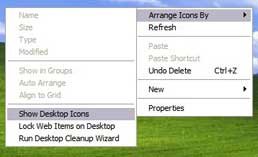
User Has Complain that my Desktop Icon is not Showing then i checked that in Document and Setting all Icons display after that i simply right click on desktop and Select Show Desktop Icons.

Outlook 2007/2003:RULES & ALERTS MISSING FROM TOOLS MENU

If you are missing option “Rules and Alerts” in the tools menu of Outlook 2003/2007, make sure that you have a email account created.  I discovered today, that the option isn’t available until you have an email account setup. If it not Solved your Problem then Try that: Run the “Detect and Repair” for Outlook(In case of Outlook 2003) Remove Office 2007(Recommended Using Ccleaner) and Then Reinstall the Fresh Copy,Definitely It will Solved the Problem.

Microsoft Office 2007 encountered an error during setup

Image
1- When You Run Setup you get that Error "Microsoft Office 2007 encountered an error during setup",You can Resolve this Error by installing .net framework 3.5 sp1 then execute MS Office Setup. 2(a)- If you Already Installed Office 2003 then 1st remove it Completely Such as No directory Remains. (According to Microsoft) In Microsoft Windows XP 1. Click Start, click Run, type cmd, and then click OK. 2. Type cd "%allusersprofile%\Application Data\Microsoft Help", and then press ENTER. 3. Type attrib -h rgstrtn.lck, and then press ENTER. 4. Type del rgstrtn.lck, and then press ENTER. 5. Type exit, and then press ENTER. But this did not work for me as rgstrtn.lck did not exist. However, typing dir /aH I saw that there was a hidden Office directory in the folder "%allusersprofile%\Application Data\Microsoft Help" So to remove this I had to run windows explorer as Administrator then I deleted all hidden files and this subdirectory in "c:\pro...

Error MS Word 2003 “A table in this document has become corrupt”

Image
When i Open a Word 2003 File it give above error,There is however a simple fix for this. From the File menu, select “open”.   In the open dialog box, select the document and then select “Open and Repair” using the drop down list next to the Open button. This should repair the document and give you a report on what has been fixed.   You can then save the document to make the repair permanent.When the document opens, a dialog box will appear to show you the repairs the document has made. Don't worry about what's listed in that dialog box, even if the list is long. Just close it and then save the document to make the repairs permanent.

How to Resolve Active Desktop Recovery

One of My User encounter that problem after a improper shutdown,in particular it forces your desktop background turn completely white that Look very bad. You can solve it easily by following: Update the following registry key: HKEY_CURRENT_USER\Software\Microsoft\Internet Explorer\Desktop\SafeMode\Components Change the value of DeskHtmlVersion to zero instead of decimal 272. Than log off and log in again.Let me Know it Works for you.

Internet Download Manager(IDM) Integration with Mozilla Firefox

Many People Asked me that how IDM integrate with Firefox,Even they download register version form Internet and install and normally also give message at the end of installation that IDM is successful Integarate with Internet Explorer and Firefox but when open any video file,a download tab is not shown on video.It make You Sad :-( Now in post i will told you that how to fix that error. 1st Install a register Version from Internet and make him register,i supposed you have original software :-) Now simply Copy the below url and put him in Firefox address bar and press enter it will ask you a install a program click OK Install now. http://www.internetdownloadmanager.com/idmmzcc/idmmzcc.xpi After successfull installation it will need to restart your firefox. Now Open Youtube or any other video web,Now it will show you a download tab. Now give smile :-),share it with Others.